Watermarks on Portfolio Photos: Do They Actually Protect Your Work?
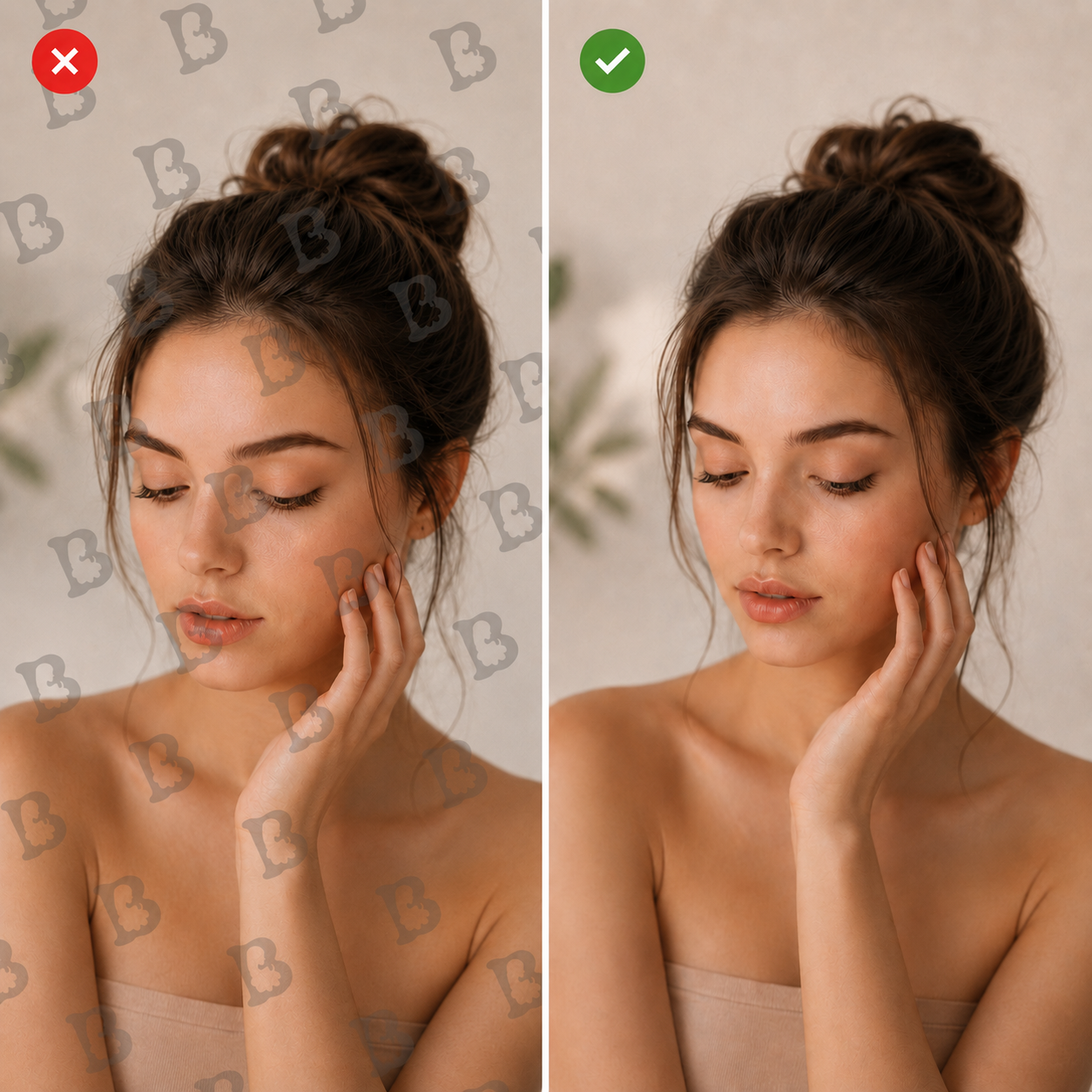
Many makers, artists, and photographers worry about their images. They want to protect their copyright and stop people from downloading their work, so they stamp a logo on every photo — sometimes a whole grid of them — cluttering the site and making it harder for visitors to look at anything.
But does it work? Is there any real benefit? And what should you do instead? Let’s go through it step by step.
The short version: a logo is branding, not protection. Use it where an image travels away from your site, keep it off thumbnails and portfolio pages, and put your effort into the things that actually hold up — originals, metadata, clear credit lines, and written terms with clients.
A logo is not copy protection
Start here, because everything else follows from it: as protection against copying, a logo barely works. It can be cropped, cloned out, or removed in a couple of minutes — and AI-based removal tools have made this faster and cleaner than it used to be.
The real purpose of a logo is different: recognition and attribution, especially when an image is saved or reposted without a link back to you. On large photos it can look good. On small ones it usually doesn’t, and automatic placement tends to land on exactly the detail that matters. It adds visual noise. At that point the logo costs more than it gives.
Today, a logo on an image works mainly as branding and navigation — not as a lock.
What a logo actually does
- Identifies the author or company. Even when the image is saved on its own, it’s clear who it belongs to.
- Builds recognition. Someone who sees your work regularly starts to remember the name or the mark.
- Brings viewers back. Especially when the logo is paired with a short URL or handle.
- Marks official material. Useful for separating your own photos from user-submitted or third-party images.
- Discourages casual copying. It won’t stop anyone determined to remove it, but it does deter people who grab images without editing them.
- Ties a series together. In catalogues, social feeds, and presentations, a consistent mark links separate images into one body of work.
When a logo helps, and when it’s just noise
A logo earns its place when an image regularly travels away from your site. Inside a well-designed portfolio it’s usually redundant: your name is already in the header, the project card, and the caption. Repeating it on the photograph itself adds nothing except a distraction from the work.
For individual pieces and client commissions, the sensible approach is to keep small images clean and add a discreet signature or site address only to material made for social media and outside distribution.
Practical rules
If you do want to use a logo, this is a workable set of rules:
- Don’t put it on thumbnails or small images.
- Leave the main portfolio photos clean too — your brand is already visible in the site design, the project caption, and your name.
- Add a small mark only to images that circulate in social media, messengers, or catalogues.
- Never place a large watermark across the centre. It ruins the presentation and still doesn’t protect the image.
- Keep originals, working files, and creation dates as proof of authorship, and state the author and usage terms in the page description.
For client work, agree publication in advance — especially where photos show people, private property, or confidential details — and deliver the originals without any logo.
Better alternatives, depending on your goal
A logo is a blunt instrument. Once you know what you actually want from it, there’s usually a cleaner way to get the same result.
If you want recognition, build it through a consistent visual style instead: colour grading, backgrounds, angles, lighting. Branded frames, margins, or a signature background colour work the same way. Distinctive typography and card layouts on your site do more for recognition than a stamp in the corner — as does a simple text credit under each photo.
If you want people to find you, put your name, studio, or web address in the caption, and add a link when you publish on social platforms. A short handle such as @brandbeautier reads better than a graphic logo. A QR code can work on promotional images — but on those only, not on every photo.
If you want clear attribution, add a line like “Work by …” next to the image, and record the author, project, and date in the page description. Keep your source files and process shots, and fill in the file’s metadata — with the caveat that metadata is easily stripped when a file is copied.
If you want to make reuse harder, publish reduced versions: a resolution that’s fine for screens but not for print. Turning off the obvious download path in your interface isn’t real protection, but it does cut down accidental copying. If you need a watermark, use a discreet text mark on large images only.
If you still want a logo on every image: four ways to do it
1. Automatically on upload
When an administrator uploads a photo, the site generates the required sizes and applies the logo immediately. This is the most common setup for catalogues and portfolios; the original is normally stored separately without the mark.
Pros: the logo becomes part of the file and survives downloading. Cons: automatic placement can cover important details.
2. Through a CMS plugin
WordPress and similar systems have watermarking modules. You set position, size relative to the photo, opacity, edge margins, and which image sizes get the mark. You could, for example, skip thumbnails entirely and only stamp images wider than 1,000 pixels.
3. As an overlay on the page
The logo is placed over the image as a separate HTML and CSS element.
Pros: the original photo is untouched, and the logo is easy to move or switch off. Cons: the downloaded file has no logo on it at all, and any visitor can hide the overlay in their browser.
4. Through an image service or CDN
Some sites use a CDN or cloud service that applies the logo when the photo is served, with position, size, and opacity set in the processing parameters. This is convenient when you have a lot of photos and need many sizes.
Typical settings
In practice, it’s better to size the logo proportionally — roughly 5–10% of the image width — rather than fixing it in pixels. Place it in a corner with a small margin and reduced opacity, and switch it off completely on small thumbnails.
A reasonable default: store originals without a logo, keep it off thumbnails, and apply it automatically only to the large versions intended for outside distribution.
That said, automatic placement often breaks the composition. If it does, drop it. For a portfolio site, presenting the work well matters more than weak watermark protection. Use the logo selectively, as a branding element — not on every photo.
What actually protects your work
None of the above is really protection. These things are:
- Your copyright already exists. In most countries you own the rights to a photograph from the moment you create it — no logo, symbol, or registration required. (In some jurisdictions, registration unlocks additional remedies, so it’s worth checking the rules where you are.) What matters in a dispute is showing that you made it first.
- Keep the evidence. Originals, RAW files, layered working files, dated exports, process shots, and client correspondence are far more persuasive than a watermark.
- Fill in the file metadata. IPTC fields for creator, copyright notice, contact, and licence take seconds to set on export and cost nothing. Note that many platforms strip metadata on upload.
- Consider Content Credentials (C2PA). This is a signed provenance record attached to the file, documenting who made an image and how it was edited. Adobe’s tools can write it at export, and a growing number of cameras sign at capture. It has the same weakness as any metadata — it can be removed, and several social platforms strip it — so treat it as a useful addition, not a safeguard.
- State the terms on the page. A short line naming the author, the year, and what’s permitted is more useful than a watermark: it removes the “I didn’t know” excuse.
- Check where your images end up. Run a reverse image search on your key photos from time to time.
- Ask for removal when it matters. Most cases are resolved by a polite email; hosting providers and platforms also have formal notice procedures.
- Agree terms with clients in writing, covering publication, credit, and how the images may be used.
A note on AI and scraping
You can ask named crawlers to stay away from your site through robots.txt. Well-behaved bots respect it; others ignore it entirely. It’s a request, not a wall — the same category as a watermark: friction, not a lock.
There’s also a trade-off worth weighing. Blocking everything indiscriminately can remove you from AI-driven search and recommendations, which is increasingly where people discover work. A selective approach — allowing the crawlers that send visitors, restricting the ones that only take — is usually more sensible than a blanket ban.
Beautier’s take
For a portfolio, we’d choose this: clean photos with no logo, a consistent site design, the author’s name under each work, and reduced web versions of the images. It looks more professional, and it doesn’t damage the work itself.